No live whistle right now
When a published match goes live, the action will appear here.
School Sports,
Simplified. Unified.
Manage fixtures, publish team sheets, and broadcast live scores. Everything your school needs to keep the sideline connected, in one place.
Everything you need
 to run your sports programme
Manage every fixture, team, and result from a single dashboard.
Fixture Management
Create fixtures across every sport and age group. Assign home & away teams, set venues, and publish schedules to staff instantly.
See how fixtures workLive Scoring
Authorised staff update match scores from their device. Public scores and alerts follow the school's visibility and notification settings.
Open the public scoreboardTeam Sheets & Selections
Coaches prepare team selections, authorised staff review when required, and approved sheets are published for the appropriate audience.
Explore team selectionsWeekend Reports
Review recorded results and prepare matchday summaries. Reporting and delivery options depend on your school's enabled features.
Explore weekend reportsNotice Board
Broadcast announcements, event details, and important updates to parents and followers with tags and read-receipt tracking.
See how notices workStaff & Coach Roles
Assign granular roles and permissions so coaches manage their own teams while admins keep full oversight.
Explore staff rolesBuilt for South African Schools
Whether you're a prep school with 3 sports or a college with 20, TeamSheet scales to fit your programme — no matter the size.
Find your school’s fit
Never miss a match
again
Schools use TeamSheet free. Verified linked parents get their child's published sporting information and current teams free, including live and final scores, team names, statistics, selections and notices.
Follow Schools
Follow schools and get a personalised feed of published fixtures, scores and results.
See how to follow a schoolLive Score Updates
Watch scores update in real time as matches are played. No more waiting for the final whistle to find out how your child's team did.
View public scoresPush Notifications
Get instant alerts straight to your phone for new fixtures, score changes, team sheet releases, and school announcements.
See how to enable alertsTeam Sheet Alerts
Know the moment team selections are published. See exactly which team your child has been placed in and when they play.
Understand published selectionsSchool Notices
Stay informed about transport changes, event cancellations, and other important updates directly from the school's notice board.
Explore school updatesNo App Download Needed
TeamSheet is a Progressive Web App — open it in any browser and add it to your home screen. No app store required, works on every device.
See home-screen instructionsSee what you could do
Open a feature to see how it works and where to go next. These are guided explanations, not access to a school’s private workspace. Availability depends on school settings and your role.
Your school sports workspace Explore
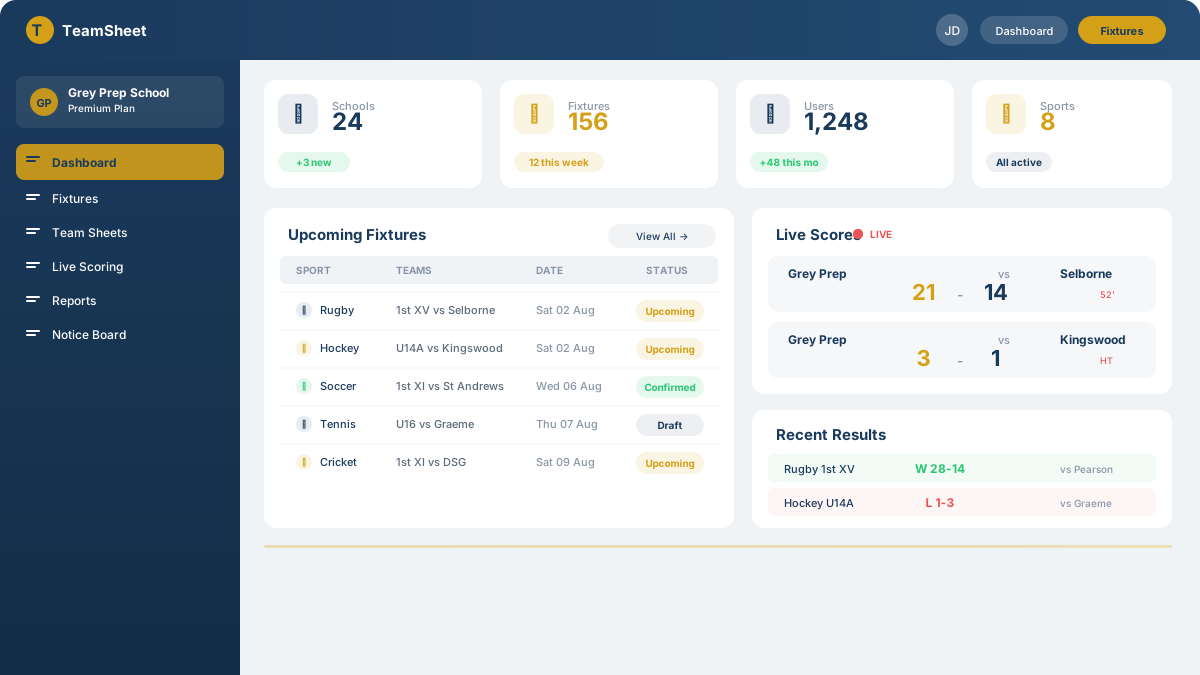
An overview of what needs attention, tailored to your role.
Coaches prepare their assigned teams. Heads of Sport oversee their sports. The Sport Coordinator follows up missing work and confirms school-wide readiness. The illustration above is a preview, not live school data.
- See upcoming fixtures and outstanding team preparation.
- Review approvals and operational blockers where your role permits.
- Open the relevant team or fixture to take the next action.
Fixture management Explore
From planning a match to sharing the published schedule.
Authorised staff prepare teams, dates and venues. School-scoped staff with publication permission decide when the fixture becomes visible to families and supporters.
- Prepare the fixture and confirm the practical details.
- Publish the schedule for the intended audience.
- Manage matchday updates, then submit and independently verify results.
Team sheets and selections Explore
A clear handoff from the Coach to the published team sheet.
Coaches prepare selections for assigned teams. Approval follows the school’s configured workflow; only approved selections can be published. Internal drafts and review notes stay private.
- The Coach selects available players and finalises the team.
- An authorised reviewer approves when the school requires it.
- Families receive the appropriate published selection; following a school does not reveal private player records.
Results and weekend reports Explore
Turn recorded match results into a useful school summary.
Authorised school and sport leaders can review results and prepare reports within their scope. Report availability, scheduling and delivery depend on school settings; this preview does not send a report.
- Record and verify match results.
- Review the results available to your role.
- Prepare and share the appropriate summary when reporting and delivery are enabled.
School notices and announcements Explore
Keep the right people informed when plans change.
Permitted senders can communicate with the audiences allowed by the school’s settings. Scheduled messages remain undispatched until their delivery time, and internal information is not automatically public.
- Prepare an update, such as a venue or transport change.
- Choose the permitted audience and confirm any large broadcast.
- Recipients see delivered notices and manage their own notification preferences.
Staff and Coach roles Explore
The right workspace, without giving everyone school-wide access.
Role permissions work together with school, sport and team assignments. A role title alone never grants access.
- Coaches own routine preparation for their assigned teams.
- Heads of Sport support Coaches and oversee their assigned sports.
- The Sport Coordinator oversees school-wide completion and publication.
Follow your school Explore
Build a feed around the schools you care about.
Create an account, find your school and choose your notification preferences. Following a school gives you the appropriate published information, not staff access or a parent link.
- Create a free account or sign in to an existing one.
- Find and follow one or more schools.
- For child-specific information, use the school’s verified parent-linking process.
Phone alerts and team sheet updates Explore
Choose the updates you want, then enable alerts on your device.
Notifications depend on school delivery settings, your preferences and browser support. A guest preview cannot enable notifications or subscribe you automatically.
- Sign in and follow the relevant school.
- Choose your alerts and explicitly allow notifications when prompted.
- On iPhone or iPad, add TeamSheet to your home screen and open it there before enabling supported push alerts.
Use TeamSheet on your device Explore
Start in your browser; no app-store download is required.
Use the same account on phone, tablet or desktop. Home-screen installation and push notifications depend on your device and browser.
- Open TeamSheet in your browser and sign in when you need your personal workspace.
- Use your browser’s Install or Add to Home Screen option if available.
- On iPhone or iPad, use Safari’s Share menu, then Add to Home Screen.
Sports and age groups Explore
Organise the sports your school offers.
Schools configure their sports, age groups and teams. Sport-specific scoring tools and other modules depend on the features enabled for that school.
- Set up the school’s sports and age groups.
- Create teams and assign a primary Coach to each active team.
- Ask us which tools fit your sports programme before getting started.
Who gets what?
Every account includes free access.
| Feature | Free Supporter |
Free
Linked Parent
Child on a team
|
|---|---|---|
| Always Available | ||
| View upcoming fixtures & schedules | ||
| Follow schools & receive notifications | ||
| Team sheet alerts | ||
| School notice board | ||
| Linked Parent Advantage | ||
| "My Child's Fixtures" dashboard section | ||
Your child's published sporting history remains free after leaving a team or school while your verified parent link remains valid. Register with the email recorded by your child's school and verify it to unlock your child and current teams. If your child is missing, ask the school to check your guardian email.
Simple, inclusive
plans
Schools use TeamSheet free, with no school subscription fee. Players, parents & supporters can create free accounts too.
School-management features at no school subscription cost
- Unlimited fixtures & team sheets
- Live scoring on match day
- Automated weekend reports
- Staff & coach role management
- Push notifications to followers
- Notice board & announcements
- All sports & age groups
- Player profiles & season statistics
- Bus & transport management
- Digital consent & indemnity forms
Available modules depend on the school's enabled configuration. Staff actions remain subject to their role and permissions.
Core access remains free for players, parents and supporters
- Players linked to a team
- Parents linked to a player
- Follow all fixtures of player affiliated schools
- Live score updates
- Team sheet alerts
- Push notifications
- Notice board access
- No app download required
Get started in
three easy steps
Pick your path — it takes just minutes to set up.
For Schools
Get Your School Onboarded
Contact TeamSheet and we’ll help set up your school profile, sports, age groups, and teams.
Schedule Fixtures & Publish Team Sheets
Add fixtures, assign teams and venues, then publish team selections so everyone knows what's coming.
Go Live on Match Day
Score matches in real time from any device. Results, reports, and notifications are handled automatically.
For Parents
Create a Free Account
Use the email your child's school records for you, then verify your email. No app download is required.
Check Your Child and Follow Their School
Your verified guardian link unlocks your child and current teams for free. Following the school adds published updates; it does not create a guardian link.
Stay in the Loop
Get live scores, team sheets, and notice board updates pushed straight to your phone — never miss a game again.
Frequently asked
questions
Find answers to the most common questions about TeamSheet.

Get in touch
Have a question or want to get your school on board? Drop us a message.
We typically respond within 2 hours during business days.
Based in South Africa, supporting schools nationwide.
Send a message
Whether you have a question about features, setup, or anything else — we are here to help.